
Metricool is still a solid social media tool. But like any other tool, it is not the best fit for everyone.
You may want cheaper scheduling, stronger collaboration capabilities, or more advanced Threads support. Or, you may be looking for cleaner workflows or better approval processes.
Whatever your reason, there are valid Metricool alternatives that might have more of what you’re looking for and less of what you don't need.
This guide breaks down 10 Metricool alternatives and shows you how to choose the right one for your team.
Try BlackTwist for free
4,000+ creators and small companies use BlackTwist to grow their audiences every monthA Quick Look at Users’ Top Picks
- BlackTwist
- Buffer
- SocialBee
- SocialPilot
- Vista Social
- Later
- Loomly
- Sendible
- Sprout Social
- Hootsuite
Top Features to Look for in Metricool Alternatives
To find what you need, you first need to have a clear idea of how Threads works and what to look for in a tool that makes your job easier.
Here are the features you need in a social media tool in order to make it stand out compared to a tool such as Metricool.
1. Threads support and platform fit
Threads now has native post scheduling. So you should see whether a tool can publish for you. Does it give you better planning, analytics, collaboration, inbox management, or automation beyond basic native posting?
These are all the essentials that can support your Threads account growth.
If you want to see what others are considering ‘essentials’, take a look at this analysis of 21,864 Threads posts in March 2026 (BlackTwist’s own analysis).
2. Calendar and approval workflow
If more than one person handles your content, you need a well-structured content calendar. Look for multi-account management, easy draft arrangement, approval steps, comments, external review, and team alerts.
3. Analytics and reporting depth
Basic post stats are not enough when you need to prove growth or report to clients. Find out if the tool offers Threads analytics such as historical data, exports, audience insights, engagement rate, best-time guidance, and shareable reports.
4. Engagement inbox and reply handling
When it comes to Threads engagement, scheduling only gets you halfway there.
Many teams also need one place to see and reply to comments, track mentions, assign messages, and keep conversations from slipping through the cracks.
5. Pricing model and team scalability
Cheap options can quickly become expensive when a tool charges by seat, by channel, or by client. Before you switch, check how pricing scales with users, social accounts, approvals, reporting, and inbox access.
If your business is growing on Threads, start with a specialist tool before you go for another broad suite. A free option is a bonus because it lets you test the tool before committing.
The 10 best Metricool alternatives
Threads users can now add up to five links in their bio, and they can track how many people visit links shared in their bio or posts.
As Threads continues to roll out more tools for creators and brands, it makes more sense to choose a platform or tool based on how well it fits your workflow.
Overview Comparison Table of Top Metricool Alternatives
| Tool | Starting at (monthly) | Threads-first focus | Mobile app | Analytics depth | Reply inbox | Multi-account | AI & automation | API | Free plan |
|---|---|---|---|---|---|---|---|---|---|
| **BlackTwist** | **$12.50** | ✅ | ✅ | ✅ | ✅ | ✅ | ✅ | ✅ | ✅ |
| **Buffer** | **$5 per channel** | ❌ | ✅ | ✅ | ✅ | ✅ | ✅ | ✅ | ✅ |
| **Later** | **$18.75** | ❌ | ✅ | ✅ | ❌ | ✅ | ✅ | ❌ | ✅ |
| **SocialBee** | **$24/** | ❌ | ✅ | ✅ | ✅ | ✅ | ✅ | ❌ | ❌ |
| **SocialPilot** | **$25** | ❌ | ✅ | ✅ | ✅ | ✅ | ✅ | ✅ | ❌ |
| **Vista Social** | **$64** | ❌ | ✅ | ✅ | ✅ | ✅ | ✅ | ✅ | ❌ |
| **Loomly** | **$49** | ❌ | ✅ | ✅ | ✅ | ✅ | ✅ | ❌ | ❌ |
| **Sendible** | **$24** | ❌ | ❌ | ✅ | ✅ | ✅ | ✅ | ❌ | ❌ |
| **Sprout Social** | **$199** | ❌ | ✅ | ✅ | ✅ | ✅ | ✅ | ✅ | ❌ |
| **Hootsuite** | **$199** | ❌ | ✅ | ✅ | ✅ | ✅ | ✅ | ✅ | ❌ |
Remember that the starting prices are calculated on an annual plan basis.
1. BlackTwist: Best tool for Threads-first creators and brands
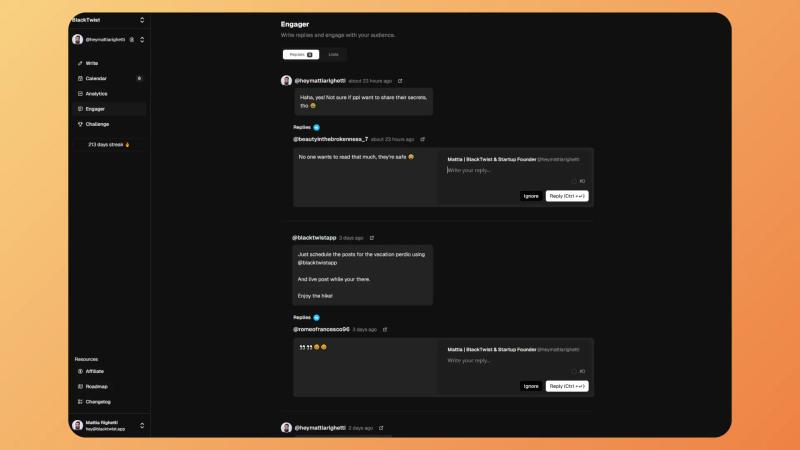
What it is:
BlackTwist is a Threads and Bluesky-focused management tool for people who care more about growth on those platforms than managing every social network.
It stays focused on tasks that matter most for Threads-first teams:
- Scheduling
- Analytics
- Multi-account management
- Automation through MCP and API access
- Mobile app access
- Reply handling, and more.
Its MCP layer also gives it a more modern workflow angle than most traditional social tools, since you can connect it to AI tools. This means that you can manage content or analytics with natural-language prompts.
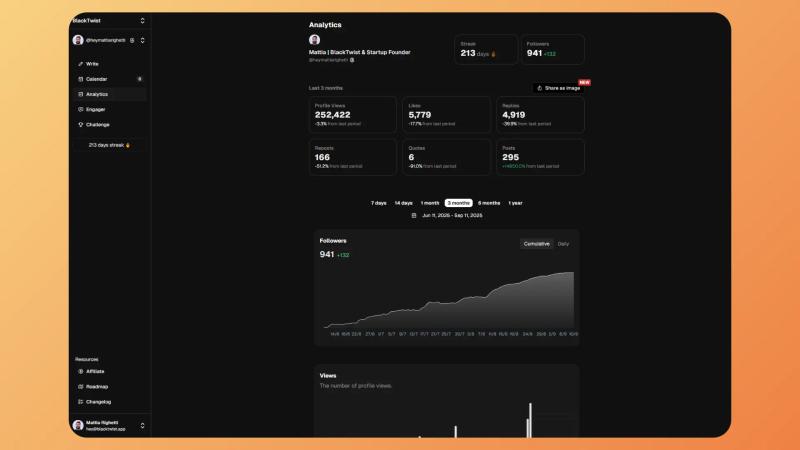
Top features
- Threads and Bluesky scheduling: Schedule single posts and full threads in advance, set preferred time slots, and queue content for the week from one dashboard.
- More in-depth Threads analytics: Track follower growth, post views, likes, replies, reposts, quotes, engagement rate, posting frequency, and best posting times in one dashboard. It also offers historical tracking and trend views beyond basic native insights.
- Dedicated reply inbox: The Engager feature gives you one clean feed for replies to your Threads posts. It lets you answer directly from BlackTwist without the clutter you get in standard notifications.
- Multi-account support: Paid plans scale by account count, which matters for creators with personal and brand profiles or teams handling several client accounts. Creator includes 5 accounts, Team includes 10, and Agency includes 20.
- MCP and API workflows: BlackTwist’s MCP server works with tools like Claude, Cursor, VS Code, and other compatible AI tools. So, you can use it to schedule posts, check analytics, manage drafts, and review best posting times through chat-style commands. This is in addition to BlackTwist’s public API, which is available in the product navigation.
Pricing
BlackTwist’s pricing page lists:
- A free plan is available
- Creator at $12.50/month billed yearly
- Team at $29/month billed yearly
- Agency at $49/month billed yearly.
The free plan includes limited scheduling, basic analytics, engagement tools, and unlimited drafts.
Best for:
Creators, personal brands, and lean teams that want to grow on Threads and do not want to pay for a broad social suite they will barely use. It also makes sense for teams that want AI-assisted workflows through MCP without adding another layer of tools.
Not ideal for:
Teams that need one dashboard for every major social network, heavier client-reporting workflows, or a full enterprise social stack. BlackTwist is strongest when Threads and Bluesky are the real priority.
Trust signals:
BlackTwist MCP server is included on every plan, including Free, and more than 4,000 creators and companies use the product.
2. Buffer: The best for simple, low-cost scheduling
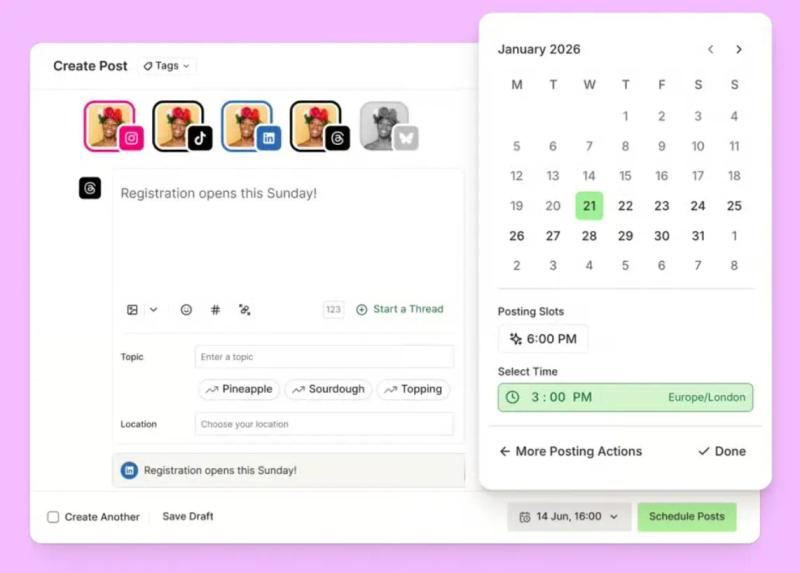
What it is:
Buffer, as a Metricool alternative, has a better focus on making publishing easy. Its current Threads support includes scheduling, comment replies through Community, and trending topics inside the composer.
All these elements make it a strong fit for solo users and very small teams.
Top features
- Schedule Threads posts and publish across multiple channels from a clean interface.
- Reply to Threads comments through Buffer Community.
- Use trending topics in the composer to spot what people are talking about.
- Start with a free plan and scale one channel at a time.
Pricing
It offers:
- A free plan available
- Essentials starts at $5 per channel per month billed yearly
- Team starts at $10 per channel per month billed yearly
Best for: Solo creators and tiny teams that want simple scheduling while getting social media management features for other platforms.
Not ideal for: Larger teams that need deeper approvals, custom roles, or stronger governance.
Trust signals: Buffer says 190,000+ creators, marketers, and small businesses use it every month.
3. SocialBee: The best tool for content recycling and small teams
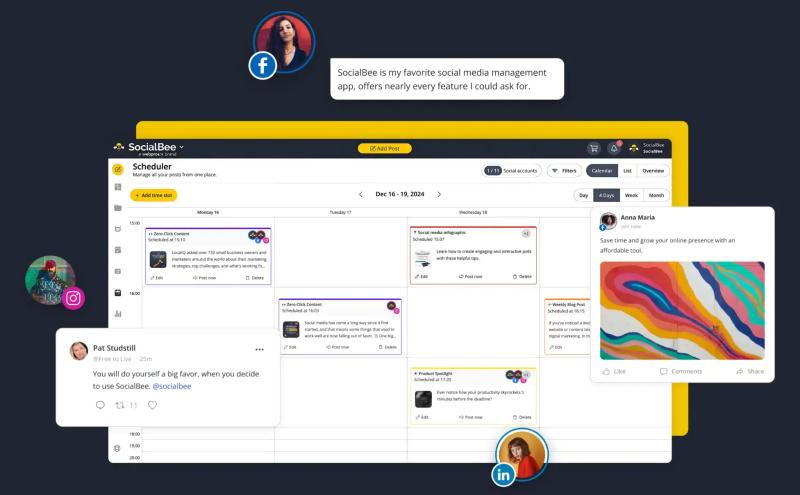
What it is:
SocialBee is a good fit when your Threads marketing workflow depends on reusable content, content categories, and a steady publishing system.
It also supports Threads and layers in bulk editing, CSV uploads, approvals, and comment tracking as plans go up.
Top features
- Organize posts into content categories and rotate them from your calendar.
- Re-queue evergreen content when you want posts to keep working over time.
- Use a bulk editor and CSV uploads on higher plans.
- Add approvals and export analytics reports as your team grows.
- Track comments and mentions for Threads, LinkedIn, and X.
Pricing
When billed annually, standard plans start at:
- $24/month for Bootstrap
- $40/month for Accelerate
- $82/month for Pro
For agencies, they offer a different pricing format.
Best for: Small teams that want more structure than a basic scheduler.
Not ideal for: Buyers who care more about polished client reporting than content reuse.
Trust signals: SocialBee says it is used by thousands of businesses.
4. SocialPilot: The best value for agencies and multi-account teams

What it is:
As an alternative, SocialPilot leans more toward multi-account management, approvals, inbox tools, and agency-friendly scaling.
It sits on the clearer side of broader tools for complex Threads social media strategy without having the premium enterprise pricing.
Top features
- Manage multiple social accounts with lower entry pricing than many premium suites.
- Use team collaboration, manager approval, and content review workflows.
- Add a social inbox and analytics on higher plans.
- Scale further with enterprise options that include API access and SSO.
Pricing
There are several tiers, including annually billed:
- Essentials starting at $25/month
- Standard at $42/month
- Premium at $85/month
- Ultimate at $170/month
Best for: Agencies and multi-account teams that want solid workflow at a lower cost.
Not ideal for: Teams that only care about Threads and would rather use a specialist.
Trust signals: SocialPilot says it is the preferred tool for more than 13,500 customers.
5. Vista Social: The best tool for engagement plus reporting
What it is:
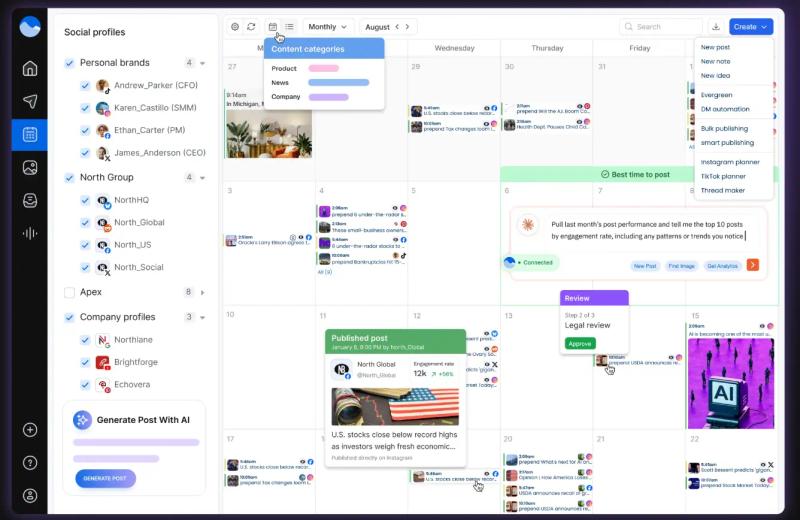
Vista Social is built for teams that want publishing, engagement, and reporting in one place. Its current Threads materials focus on planning and scheduling, as well as analytics, inbox replies, and exports.
Top features
- Plan, schedule, analyze, and engage on Threads (without using baits).
- Use an inbox plus reply tools to manage conversations.
- Export reports in formats like CSV and PDF.
- Add approval flows, internal notes, and automation features on higher plans.
- Use DM automations across supported channels.
Pricing
There are no free plans, and paid tiers are listed as:
- Professional starts at $64/month
- Advanced at $120/month
- Scale at $304/month
- Custom pricing also available
Best for: Teams that care as much about engagement and reporting as they do about scheduling.
Not ideal for: Solo users who only need a light publishing tool.
Trust signals: Vista Social says it is trusted by 30,000+ brands and agencies, and it also highlights official Meta and TikTok app status.
6. Later: The best tool for creator brands and visual planning

What it is:
Later is a strong creator-focused option for brands that care about visual planning, simple collaboration, and support for multiple post types.
Its Threads scheduling is available on all plans, including Free, and it supports text, image, video, and carousel posts.
Top features
- Schedule Threads posts on all plans, including Free.
- Publish text, image, video, and carousel Threads posts.
- Use content approvals, feedback, and external review workflows.
Pricing
Plan prices are on the higher end, listed as:
- Starter starts at $18.75/month billed yearly
- Growth at $37.50/month billed yearly
- Scale at $82.50/month billed yearly
Best for: Creator brands and visual-first teams.
Not ideal for: Agencies that need heavier client reporting or larger account bundles.
Trust signals: Later shows customer logos including Walgreens, Method, Crayola, GoPro, Mondelez, and Pottery Barn.
7. Loomly: The best tool for planning and approvals

What it is:
Loomly is a planning-first platform that does a good job with approvals, content workflows, and team visibility.
The Threads support users get from Loomly covers text, image, video, and carousel posts, and its collaboration features are some of the clearest in this group.
Top features
- Schedule text, image, video, and carousel posts to Threads.
- Use multi-step approval workflows and custom permissions.
- Get Slack and Microsoft Teams notifications around workflow activity.
- Manage comments and messages with inbox tools, saved replies, and bulk actions.
- Get post ideas and optimization tips while planning content.
Pricing
Tiers are listed as:
- Starter is $49/month
- Beyond $249/month
- Enterprise at custom prices
Best for: Small teams and brands that need tighter planning and review.
Not ideal for: Buyers who mainly want the cheapest way to schedule posts.
Trust signals: Loomly says 50,000+ marketers use the platform.
8. Sendible: The best software for client-facing agencies
What it is:
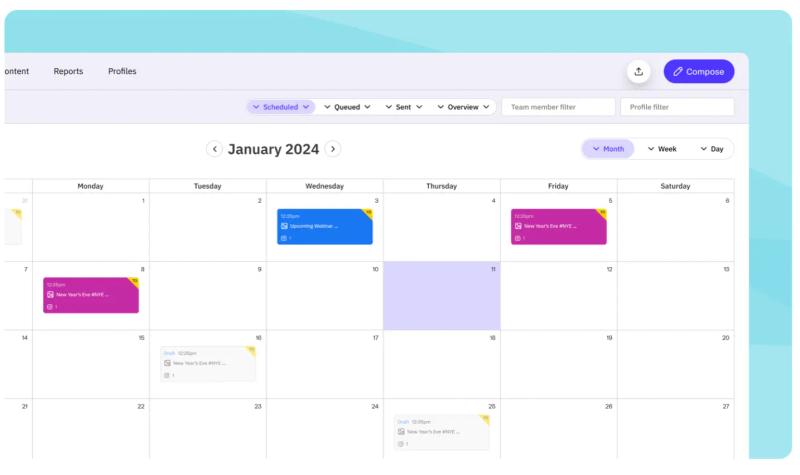
Sendible is aimed at agencies that need client dashboards, approvals, and flexible reporting while still keeping social publishing simple.
The Threads services it offers focus on scheduling, previews, AI help, and managing multiple channels from one place.
Top features
- Plan, preview, and schedule Threads posts from one dashboard.
- Use client dashboards for content and reporting.
- Add assignment and approval tools on team plans.
- Use custom and automated reports on higher plans.
- Improve posts with AI Assist, optimal times, and custom tags.
Pricing
The listings show several tiers (billed annually):
- Creator starts at $24/month
- Traction at $75/month
- Scale at $165/month
- Advanced at $275/month
- Enterprise starts at $675/month
Best for: Agencies that need client-facing workflow without going full enterprise.
Not ideal for: Solo creators who only need a lightweight scheduler.
Trust signals: Sendible highlights G2 badges.
9. Sprout Social: The best pick for enterprise workflows and analytics
What it is:
Sprout Social is a great pick for large teams that need stronger governance, reporting, and inbox workflows.
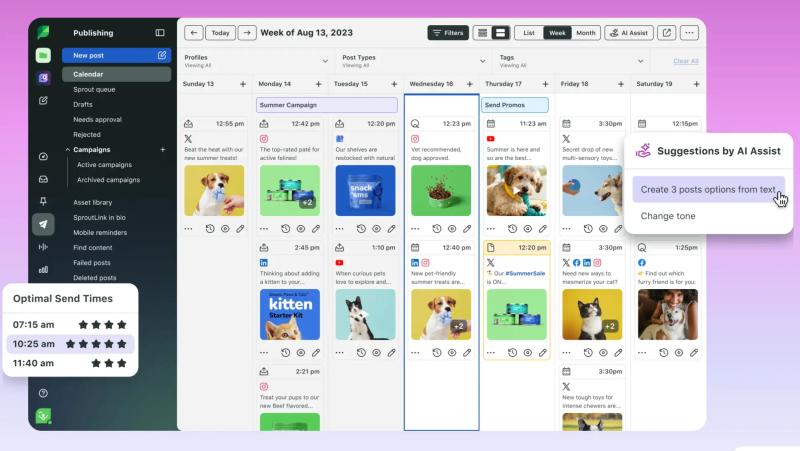
Its current Threads materials cover scheduling, engagement through Smart Inbox, and reporting tied to audience and post performance.
Top features
- Schedule and publish to Threads from a shared workflow.
- Reply to Threads comments through Smart Inbox.
- Use Threads reports to track audience and engagement.
- Build broader team workflows with asset reuse, approvals, and structured collaboration.
Pricing
With enterprises and complex workflows Sprout Social offers, prices are relatively higher even with annual billing:
- Standard at $199/month
- Professional $299/month
- Advanced $399/month
- Enterprise available at custom prices
Best for: Enterprise teams that need control, reporting depth, and shared inbox workflow.
Not ideal for: Budget-conscious users or small teams with simple needs.
Trust signals: Sprout Social says it is trusted by 30,000+ brands.
10. Hootsuite: The best tool for large cross-channel teams
What it is:
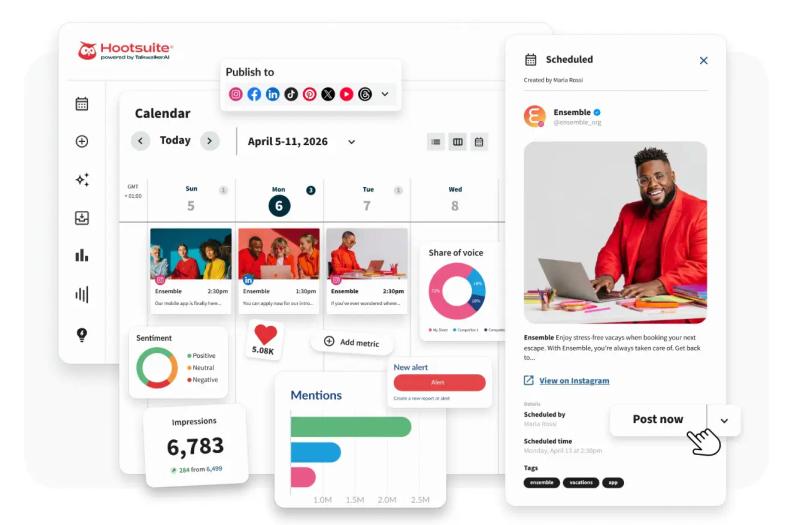
Hootsuite remains a relevant alternative to Metricool because it offers broad social coverage, large-team controls, analytics, inbox tools, and listening features in one platform.
Its Threads pages now position it around scheduling, analytics, and monitoring, as well as basic posting.
Top features
- Schedule, draft, and publish Threads content inside a broader cross-channel workflow.
- Track Threads analytics like engagement rate, impressions, and interactions.
- Use inbox tools, saved replies, automated responses, tags, and conversation history.
- Add listening and trend monitoring for bigger teams.
- Control access with team permissions, custom permissions, and SSO on higher levels.
Pricing
Hootsuite’s public pricing currently shows:
- Standard at $199/month
- Advance at $399/month
- Enterprise available at custom prices
Best for: Large teams that run many channels and want one broad platform.
Not ideal for: Small teams looking for the lowest-cost option.
Trust signals: Hootsuite shows 3,800+ five-star reviews and G2 badges on its pricing page.
How to choose the right Metricool alternative
Use this simple filter:
- If you mainly care about growth on Threads, choose a specialist. BlackTwist makes the strongest case here because it is built around Threads and Bluesky workflows, with scheduling, analytics, replies, MCP access, and a REST API.
- If you need broad (across platforms) publishing and simple pricing, choose a lightweight scheduler. SocialPilot, Hootsuite, and Later offer low-friction options, especially for team-based users.
- If you run approvals and client accounts, choose an agency-first tool. SocialPilot is the value pick, while Sendible is the cleaner client-dashboard pick.
- If you need stronger engagement and reporting, choose Vista Social. It puts inbox, replies, exports, and reporting front and center.
- If you are creator-first and visual-first, choose Later or Loomly. Later is easier for creator brands, while Loomly is stronger on approvals and team review.
- If you need enterprise reporting and governance, choose Sprout Social or Hootsuite. Sprout feels more premium on workflow and reporting. Hootsuite feels broader on cross-channel operations and listening.
Want the focused option for Threads growth? Start with BlackTwist’s free plan, then compare it against one broad suite before you switch.
FAQ
What is the best Metricool alternative for Threads?
BlackTwist is the strongest specialist pick for Threads because it focuses on Threads and Bluesky workflows, including scheduling, analytics, reply handling, MCP access, and a REST API.
Buffer, Later, Vista Social, Sprout Social, and Hootsuite also support Threads, but they are broader tools.
What is the cheapest Metricool alternative?
Buffer has the lowest verified paid entry price in this list at $5 per channel per month billed yearly, and it also has a free plan. BlackTwist also has a free plan and lower-cost paid entry than many team tools, starting at $12.50/month billed yearly.
Which Metricool alternative is best for agencies?
For agencies, SocialPilot is the best value pick, and Sendible is the best client-facing pick. SocialPilot focuses on approvals, analytics, inbox, and multi-account scaling, while Sendible adds strong client dashboard and reporting features.
Which Metricool alternative is best for small teams?
SocialBee, Later, and Loomly are all strong for small teams. SocialBee works well when you want reusable content and approvals, Later fits creator brands and visual planning, and Loomly is better when review workflow is the main issue.
Is Metricool better for analytics than other tools?
Not always. The better choice depends on what you need to measure. BlackTwist goes deeper on Threads and Bluesky workflow data, Vista Social and Sendible lean into reporting for marketers and agencies, and Sprout Social and Hootsuite offer stronger enterprise-style reporting and inbox data.
Learn how to run weekly Threads analytics reviews from Claude here.
Do I still need a third-party tool if Threads has native scheduling?
Sometimes yes. Native Threads scheduling is useful for basic posting. However, third-party tools can add approvals, analytics, shared calendars, inbox tools, exports, and multi-account workflow that native posting does not promise on its own.
Which tools support Threads right now?
All 10 tools in this guide have current public Threads support pages or help docs: BlackTwist, Buffer, SocialBee, SocialPilot, Vista Social, Later, Loomly, Sendible, Sprout Social, and Hootsuite.
Related Reading
- How to Go Viral on Threads
- Threads Monetization: How to Turn Your Content into Income
- 10 Best Alternatives to Typefully
- Can You View Threads Without an Account
- How to Make a Threads Account
- Does Threads Notify When You View a Profile
Takeaways
In April 2025, Meta expanded Threads ads to eligible advertisers globally. That shows how Threads is becoming a more serious platform for brands and campaigns.
So casual posting isn’t enough anymore, and you need a system if you want your account to stand out.
If Metricool feels too broad or no longer fits the way you work, do not just replace it with another broad tool by default. Match the tool to the job. If the job is Threads growth, pick a platform-specific tool that offers all the essentials.
Still deciding? Try BlackTwist for free now and see how it fits your workflow.