Changelog
New crossposting experience 📣
You no longer need to write the same post twice.
We just launched a new crossposting experience. Write a post once and BlackTwist sends it to Threads and Bluesky.
Social sets
Open Settings and go to Social sets. Put your Threads account and your Bluesky account in the same set.
From then on, the account you write as decides where a post goes. It goes to every account in its set. An account that belongs to no set posts alone.
Sets are shared with your workspace, so a change there applies to everyone in it.
One entry in your calendar
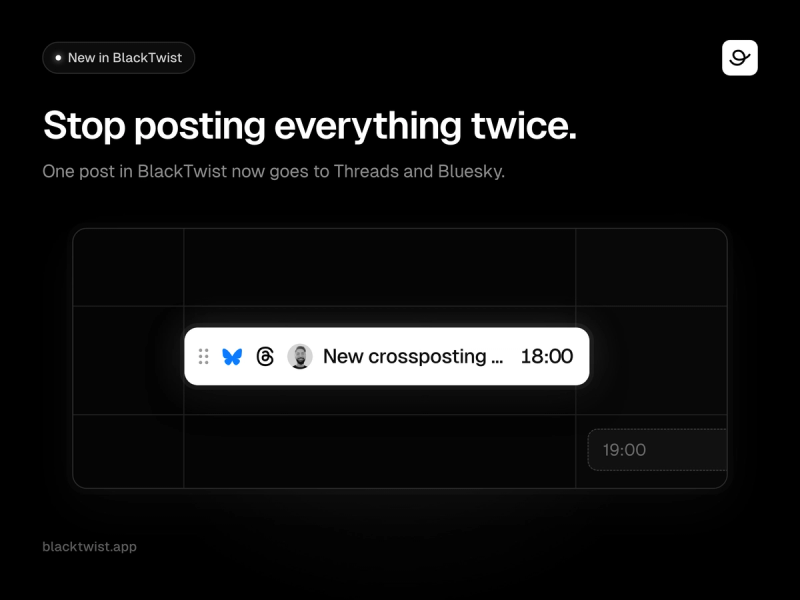
A crossposted post shows up once in your calendar, with the Threads and Bluesky icons on it.
Detached posts
Bluesky caps posts at 300 characters. Threads gives you 500.
When one post in a thread needs different text on one platform, detach it. That post keeps its own text. The rest of the thread stays in sync.
What's new
- Social sets. Group your accounts across platforms in Settings.
- One calendar entry. See a crossposted post once, with both platform icons.
- Detached posts. Give a single post its own text for one platform.
Why you'll love it
- You write each post one time.
- You stop cutting every thread down to fit the shortest limit.
- Your calendar shows what you planned, once.
Open Settings, create your first set, and write your next post once.
AI Studio is live ✨
A blank week is harder than a blank page.
We just launched AI Studio, one place to write with AI in BlackTwist. It replaces the Post Generator and the Weekly Generator, which used to live in two different corners of the app.
Open it from AI Studio in the sidebar, or from the Generate with AI button on Write, Dashboard and Calendar.
Fill my week
BlackTwist writes a post for every free slot in your posting schedule, in your voice, based on the topics you already publish about.
Every free slot is selected for you, so most weeks are two clicks: Generate, then Schedule. Review what comes back, untick anything you do not want, and the rest goes straight onto your calendar.
Single post
Start from a viral template, one of your best performing posts, or an article you paste in. You get several ready-to-publish variants back. Edit one in the editor, save it as a draft, or drop it into your queue.
What's new
One page, two modes: pick how you want to work the moment you open it, and switch any time. Content profile: read and edit the description of your topics and style that the AI writes from. Cancel mid-run: stop a weekly generation while it is going and keep everything already written. History: everything you have generated, searchable and filterable by mode. Cost up front: the credit cost of a run is shown before you generate, never after.
Why you'll love it
A week of content in two clicks instead of one post at a time. It sounds like you, because it learns from what you have already published. Nothing is published without you. You review every post before it is scheduled.
Available on the Creator plan and above. Every generated post uses 2 credits from your monthly allowance, and your balance is always shown at the top of the page.
Open AI Studio and fill your week!
Posts with GIFs 🎬
We know you want to have fun on Threads, and GIFs are the easiest way to do so!
Starting today, you can publish and schedule posts with GIFs.
Pick the option, navigate the GIFs, it's that easy!
Agents: Let Your AI Run BlackTwist 🤖
Stop switching between BlackTwist and your favorite AI assistant. Your AI now talks to BlackTwist for you.
Claude, ChatGPT, and other AI assistants can draft posts, schedule content, and pull your analytics from BlackTwist using natural language.
Tell your AI what you want. It handles the rest.
Ask Claude to "schedule 5 posts for next week" or tell ChatGPT to "show me my best posts this month." Agents fits the workflow you already have.
What's new
Native AI integration: Connect BlackTwist to Claude (Desktop, Web, Mobile, Code), ChatGPT, OpenAI Codex, Microsoft Copilot Studio, Lovable, n8n, and Notion in a few clicks.
Full posting control: Draft, edit, and schedule posts on Threads and Bluesky from your AI conversation.
Live analytics: Ask your AI for engagement metrics, daily recaps, posting recommendations, and follower growth without leaving the chat.
Why you'll love it
No more switching apps: Plan, write, and schedule your content in the same place you already work with your AI.
Free on every plan: Agents is included for all BlackTwist users at no extra cost. Advanced analytics still require a paid plan.
Built on an open standard: Any AI assistant that supports the Model Context Protocol works out of the box, so the list of supported clients keeps growing.
Learn how to use Agents in 4 posts:
Post 1 Connect Claude to BlackTwist in 30 seconds and schedule your first post through a conversation.
Post 2 Plan and schedule a full week of content with a morning short post, midday thread, and evening one-liner per day.
Post 3 Set up automated follow-up replies that trigger when your best posts take off.
Post 4 Run a weekly analytics review, build a custom dashboard, and let Claude propose content pillars for the week ahead.
Read the full docs at blacktwist.app/mcp/docs/introduction
Bulk Upload: Turn Spreadsheets into Posts 🚀
Stop the "copy-paste saga" and start scaling your presence on Threads and Bluesky.
We just launched Bulk Upload, the most requested feature for creators and agencies who prefer planning their content in spreadsheets.
Instead of uploading posts one by one, you can now schedule up to 100 posts at once using a single CSV file.
Whether you are breaking down a long-form article into bite-sized updates or prepping a month's worth of "Tip Tuesdays," Bulk Upload fits perfectly into your existing workflow.
What’s new:
CSV Import: Download our template, fill in your text, media URLs, and preferred times, and watch your queue fill up in seconds.
Media Support: Include publicly accessible image or video URLs in your spreadsheet to automatically attach them to your posts.
Review & Edit: After uploading, you can review, tweak captions, or swap images in the Weekly Calendar view before finalizing your schedule.
Why you'll love it:
Save Hours of Work: Schedule a month of content in minutes rather than hours.
Maintain Consistency: Easily plan recurring or seasonal campaigns in one sitting.
Collaborate Better: Prepare your content in Excel or Google Sheets, get approval, and import it when you're ready.
Inspiration Hub 💡
Staring at a blank page?
We just launched the Inspiration Hub.
We analyzed 1,000+ posts, identified the 40 formats that go viral most often, turned them into templates, and added step-by-step instructions so you can easily create your own version.
Publish your viral post today, visit the Inspiration Hub!
Hourly engagement 🕑
We've added a new chart in Analytics.
See engagement levels by hour of the day, with averages and weekday breakdowns.
Use it to find the best time to schedule your posts and maximize reach.
(P.S. only available on a paid plan).
Watch the demo video below for a quick tour.
Weekly Calendar 🗓️
We're glad to introduce the Weekly Calendar View!
Comfortably schedule your posts for the week, and see your time slots to fill your planned content at lightning speed.
Light mode support 🔆
Starting today, you can choose how you want to experience the app.
- Light Mode – a fresh, bright interface
- Dark Mode – the classic look you're used to
- System – automatically adapts to your device settings
We’ve also prepared a short video to show you how it works
Repurpose Posts from the Analytics
You can now repurpose your best-performing content directly from the Analytics page.
Analyze your posts using key metrics — views, likes, reposts, quotes, and engagement rate — and instantly schedule them again with a single click.
Perfect for giving high-impact posts a second life.
💡 Available exclusively on paid plans.
Add post to queue or pick a slot
You can now choose the right scheduling slot without leaving the Scheduler view.
What’s new:
- See all your predefined scheduling time slots
- Add a post to the next available slot
- Manually select any slot that fits your schedule
A faster, more flexible way to queue content.
(Define your time slots in the Settings)
Mobile friendly analytics
BlackTwist is now fully mobile-friendly.
Access your analytics anytime, anywhere — without the frustration.
Sticky date picker stays visible as you scroll
One-tap filters to quickly find past posts
Fully responsive UI for a smooth mobile experience
Powerful insights — right from your phone.
Analytics date ranges and posts filter
We've added more customisations to the analytics page, making it even easier to analyse what matters.
Sticky date filters — your selected date range stays visible and accessible while you scroll through your data.
Historical post filter — instantly find specific posts from your history, no more endless scrolling.
No more hunting for insights — they’re always in reach.
Weekly Time Slots & Quick Scheduling
You can now define your preferred time slots for each day of the week — perfect for setting your ideal posting routine.
When you’re in the Calendar view, you can quickly schedule content directly into any of your pre-defined slots. No more guesswork or manual time picking — just select a slot and you’re good to go.
Your Threads growth starts here.
Schedule smarter. Grow faster. Start free.BlackTwist
Give your social a twist.
Links
PricingThreads SchedulerEngagerAnalyticsAI StudioCompareThreads vs. BlueskyHelp centerChangelogGlossaryBlog✨ Affiliate — Earn 30%
© Copyright 2026 BlackTwist. All rights reserved.