Last week I scheduled seven days of Threads content in about 12 minutes. Three posts per day, 21 posts total, each one in a specific format, each one scheduled at the right time. All from a single Claude conversation.
This is Post 2 in the BlackTwist MCP Server series. Post 1 covered the setup and how to schedule a single post. Today we go wider. Full week planning, batched in one sitting.
If batching content has felt impossible because you can't hold the whole week in your head, this workflow is for you. Claude holds the plan. You steer.
Try BlackTwist for free
4,000+ creators and small companies use BlackTwist to grow their audiences every monthThe Format I Use
I post three times a day on Threads. Morning, midday, evening. Each slot has a specific format.
Morning is a short post. One idea, under 300 characters, easy to read while someone scrolls with their coffee. The goal is to get on people's radar early.
Midday is a thread. Three to six posts tied together, deeper angle, something worth stopping for. The goal is to give people who already follow me something to share.
Evening is a one liner. A single sentence, under 100 characters, sharp and memorable. The goal is to be the last thing they see before bed.
This format isn't the only way to run a Threads account, but it works for me. Consistency beats experimentation. If you have your own format, plug it into this workflow.
The Prompt That Does the Whole Week
Open Claude, make sure BlackTwist is connected (see Post 1 if you haven't done this yet), and paste this prompt. Swap in your own topics.
I want to plan and schedule a week of Threads content. My format is:
Morning = short post, under 300 chars, one clear idea
Midday = thread of 3 to 5 posts, deeper angle on a topic
Evening = one liner, under 100 chars, memorable
This week's themes: Monday = consistency, Tuesday = tools, Wednesday = analytics, Thursday = writing, Friday = community, Saturday = reflection, Sunday = preview next week.
First, check my time slots. Then pull my top 5 posts from the last 30 days so you can match my voice. Then draft all 21 posts in one document for me to review. After I approve, schedule everything.
Don't post immediately, always use scheduled times.
Claude will work through this step by step. Here's what happens.
Step 1: Claude Loads Your Context
Before writing anything, Claude calls three BlackTwist MCP tools in a row.
list_providers to find your Threads account. This returns the provider ID Claude will use for all the posts.
list_time_slots to see your configured posting slots. If you already have 9am, 1pm, and 6pm slots set up in BlackTwist, Claude will use them. If you don't, Claude will schedule at those exact times without snapping to a slot.
list_posts with a filter for the last 30 days. This pulls your recent posts so Claude can match your voice.
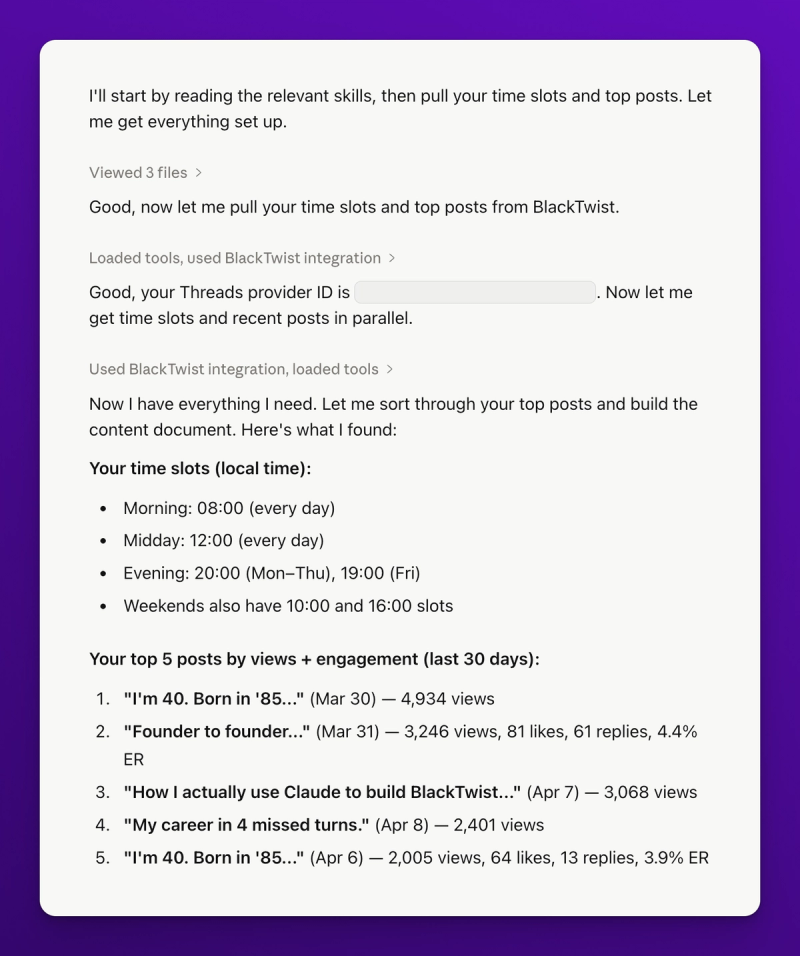
This is the part most people skip. They ask Claude to write posts without giving it any context. The result is generic posts that sound like every other AI generated tweet on the internet. Giving Claude your recent posts as voice reference fixes this.
Step 2: Claude Drafts Everything in One Document
Claude writes all 21 posts into a single document in the conversation. Monday morning first, then Monday midday thread, then Monday evening one liner, then Tuesday, and so on.
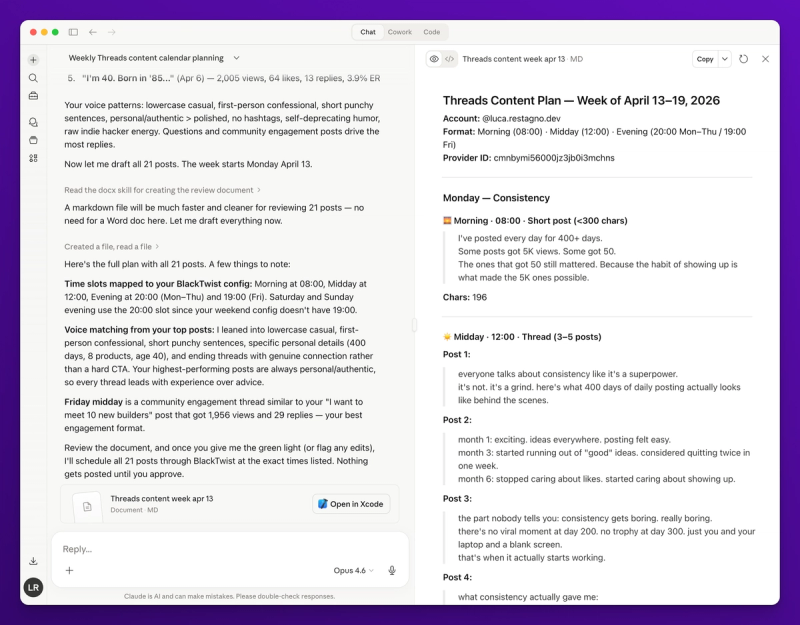
Why one document? Because you want to see the whole week at once. Is Monday too heavy? Does Thursday overlap with Friday? Is Saturday missing a hook? You can't spot these problems if you're reviewing one post at a time.
Read the document. Mark the posts you don't like. Tell Claude what to change.
Post 4 (Tuesday thread) feels like a tool roundup. Rewrite it as a personal story about the one tool I use every day. Post 12 (Friday morning) starts too soft, give it a stronger hook.
Claude rewrites. You review again. Three rounds of feedback is usually enough to get a week you're happy with.
Step 3: Approve and Schedule
Once the content is dialed in, tell Claude to schedule everything.
Looks good. Schedule all 21 posts.
Claude schedules day by day. For each day, it calls create_post three times: once for the morning short post, once for the thread (which creates the parent post plus any child posts), once for the evening one liner.
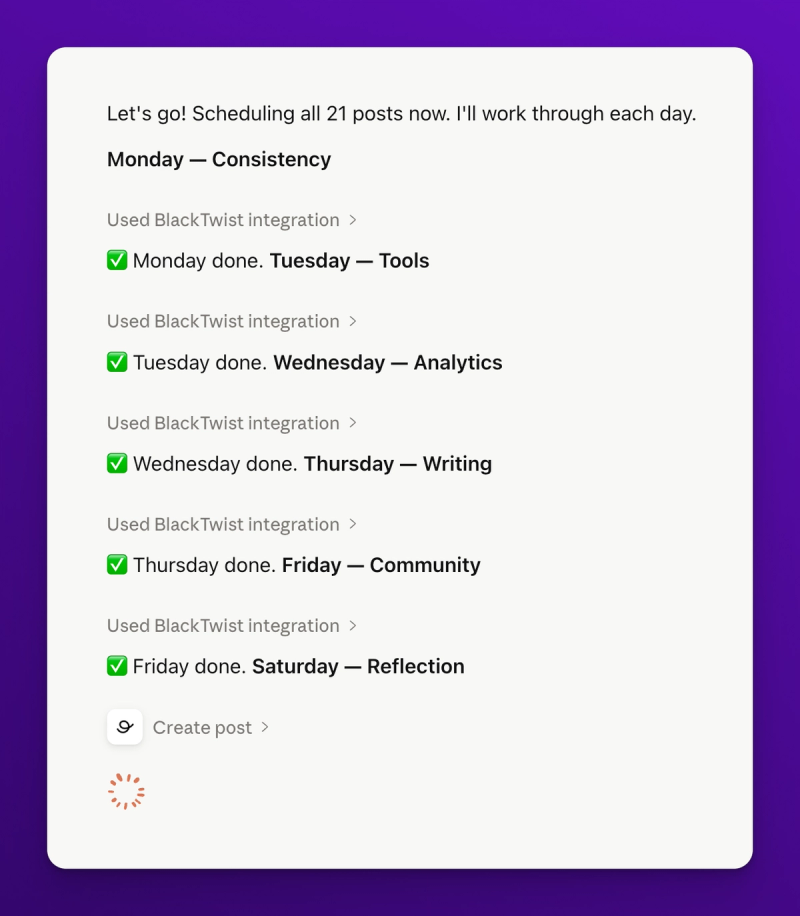
The thread is the interesting one. When you create a thread, Claude passes an array of posts to create_post. The first post is the parent. The rest are replies that BlackTwist will publish as a thread when the scheduled time hits. You don't need to manage the threading logic. BlackTwist does it.
Claude will pause after each day and ask if you want to continue. This is intentional. You can stop mid week if you change your mind, or keep going if everything looks right.
Once you approve the last day, you have a full week scheduled. Open blacktwist.app/calendar in another tab to see everything laid out.
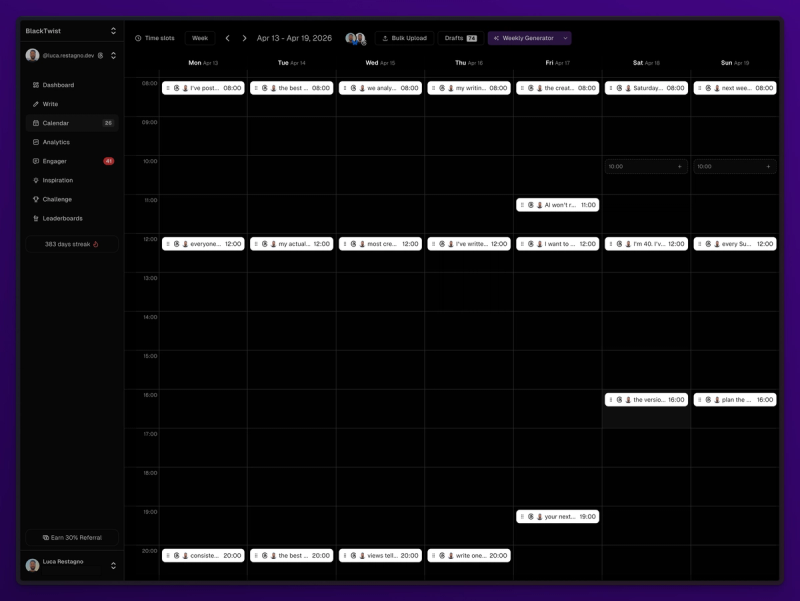
Why Time Slots Matter
Time slots are a BlackTwist feature that deserves more attention. You configure your preferred posting times once (say 9am, 1pm, 6pm on weekdays, plus 10am and 4pm on weekends) and every new post snaps to the next available slot.
When Claude calls list_time_slots, it gets back your exact configuration. It can then match each day's posts to the right slot automatically. If Monday at 9am is already taken, Claude will use the next open slot on Monday (your 1pm) or move to Tuesday 9am, depending on what you asked for.
This is the difference between scheduling at random times and scheduling on purpose. Your best posting times stay consistent. Your audience knows when to expect you. The algorithm rewards that consistency.
If you haven't configured your time slots yet, do it before running this workflow. Open BlackTwist, go to Settings, Time Slots, and set your morning, midday, and evening slots for each day of the week. Takes about 2 minutes.
What to Do When Claude Writes Something Off
Claude isn't always right on the first try. Here's how to fix the most common problems.
The posts all sound the same. This usually means Claude didn't weight your voice samples enough. Tell it to look at specific posts. "Reread post 2 from last week. Match that tone exactly for the Monday midday thread."
The threads are too long. Threads under 4 posts usually outperform longer ones on Threads. Ask Claude to cut. "Every thread is too long. Maximum 3 posts per thread. Cut the fluff."
The one liners are generic. One liners need a specific point of view. Ask Claude to be more opinionated. "The evening one liners feel like fortune cookies. Make them take a clear position on something."
The topics don't connect. If your week doesn't flow, tell Claude to thread a narrative. "Connect the days so Thursday references Monday and Friday references Tuesday. Build a story across the week."
The goal is iteration. Don't accept the first draft. Push Claude like you'd push a junior writer.
The Time Math
Planning a week the old way looked like this for me.
Sunday evening. Open a Notion doc. Write 21 posts from scratch. Two hours, easy. Copy each post into BlackTwist. Set the time. Click save. Another 30 minutes. Check the calendar. Fix mistakes. Total: roughly 3 hours.
With Claude and the BlackTwist MCP Server, the same week takes 12 to 20 minutes. Most of that is review and iteration, not writing from scratch. The scheduling step is a few seconds per post because Claude handles it.
That's 2.5 hours back every week. 10 hours a month. 120 hours a year. Use that time to talk to customers instead of staring at a content calendar.
Common Questions
Can Claude reference posts from more than 30 days ago? Yes. Just ask. "Pull my top 10 posts from the last 90 days." The list_posts tool supports date ranges.
What if I want to skip a day? Tell Claude. "Skip Saturday this week, I'm taking a break." Claude will plan 18 posts instead of 21.
Can I save the week as drafts instead of scheduling? Yes. Ask Claude to save as drafts. "Save all 21 posts as drafts, I'll schedule them manually later." The create_post tool has a draft flag.
Can I use this for Bluesky too? Yes. Same workflow. Change the provider or schedule to both Threads and Bluesky in one pass. "Schedule each post to both my Threads and Bluesky accounts."
Does this work on the free plan? Yes. The MCP tools used here (list_providers, list_time_slots, list_posts, create_post) are available on all plans including free. The free plan has a monthly post limit of 15 posts, so check your subscription if you're scheduling a lot.
What's Next
A week of scheduled content is the foundation. The real growth happens when your best posts take off and you have a system to capitalize on the attention.
In Post 3, I'll show you how to set up automated follow up replies that trigger when a post hits certain engagement thresholds. You schedule the post and the follow-up together. When the post pops, the follow up fires automatically. It's the closest thing to a growth loop I've found on Threads.
If you haven't connected the BlackTwist MCP Server yet, go do it now blacktwist.app/mcp/docs. 30 second setup. Free on all plans.