Your best post this month probably deserved a follow-up and didn't get one. Mine did too. For months, I watched posts hit 200 likes and then just sit there. The attention came and went. I was busy with client work, asleep, or eating dinner with my family. By the time I saw the post blowing up, the moment was over.
The fix is automation. Set up a follow-up reply in advance. Define the trigger (say 100 likes or 30 replies). Write the reply. When the post reaches the threshold, BlackTwist automatically fires the reply. Whether you're awake, online, or on a hike.
This is Post 3 in the BlackTwist MCP Server series. Post 1 covered setup. Post 2 covered weekly planning. Today we wire Claude to set up follow-ups for every post you schedule.
Try BlackTwist for free
4,000+ creators and small companies use BlackTwist to grow their audiences every month- Why Follow-Ups Matter
- The BlackTwist MCP Tools You Need
- Workflow 1: Set a follow-up on Your Most Recent Post
- Workflow 2: Set Follow-Ups for an Entire Week
- Workflow 3: Smart Follow Ups Based on Post Type
- Workflow 4: Review and Adjust Existing Follow-Ups
- What Makes a Good Follow-Up
- Common Questions
- What's Next
Why Follow-Ups Matter
A follow-up reply is a comment you post on your own post after it gets traction. Usually a link to something. Your newsletter. Your product. A case study. An offer.
On Threads, the comment section is the second feed. When your post gets surfaced to new people, they don't just read the post. They scroll the replies. If your first reply is from you and it gives them somewhere to go, a real percentage will go.
The math is simple. If 10,000 people see your post and 5% read the comments, that's 500 people seeing your follow-up. If 10% of them click, that's 50 new clicks from a single post. Do that on 3 to 5 posts per week, and your follow-up replies become a reliable traffic source.
The problem is timing. If you post the follow-up too early, the post doesn't have enough reach yet, and the follow-up gets lost. If you post it too late, the moment is over, and the scrollers have moved on. You want the follow-up to appear right as the post peaks.
Automated follow-ups solve this. BlackTwist watches the post. When it hits your trigger, BlackTwist posts the reply. You set it once and forget it.
The BlackTwist MCP Tools You Need
Claude uses a few specific tools to manage follow-ups.
get_follow_up_templates returns your saved follow-up templates. If you reuse the same "link to my newsletter" reply on every post, you save it as a template once, and Claude applies it to new posts by reference.
get_thread_follow_up returns the follow-up configured on a specific post. Claude uses this to check if a post already has a follow-up or to read the current settings.
set_thread_follow_up creates or updates a follow-up on a post. This is the tool that does the work. You tell Claude the post, the trigger, the reply text, and the time delay.
You can do all of this from the BlackTwist dashboard. The point of using Claude is that you can handle it inline, in the same conversation where you draft the post, without switching tabs.
Workflow 1: Set a follow-up on Your Most Recent Post
Simplest case. You just scheduled a post, and you want a follow-up on it.
Look at the last post I scheduled. Set up a follow-up reply that triggers when it gets 50 likes. The reply should say: If this was useful, I share one Threads growth idea per week in my newsletter. Link in bio.
Claude calls list_posts to find your most recent scheduled post, extracts the thread ID, then calls set_thread_follow_up with your parameters.
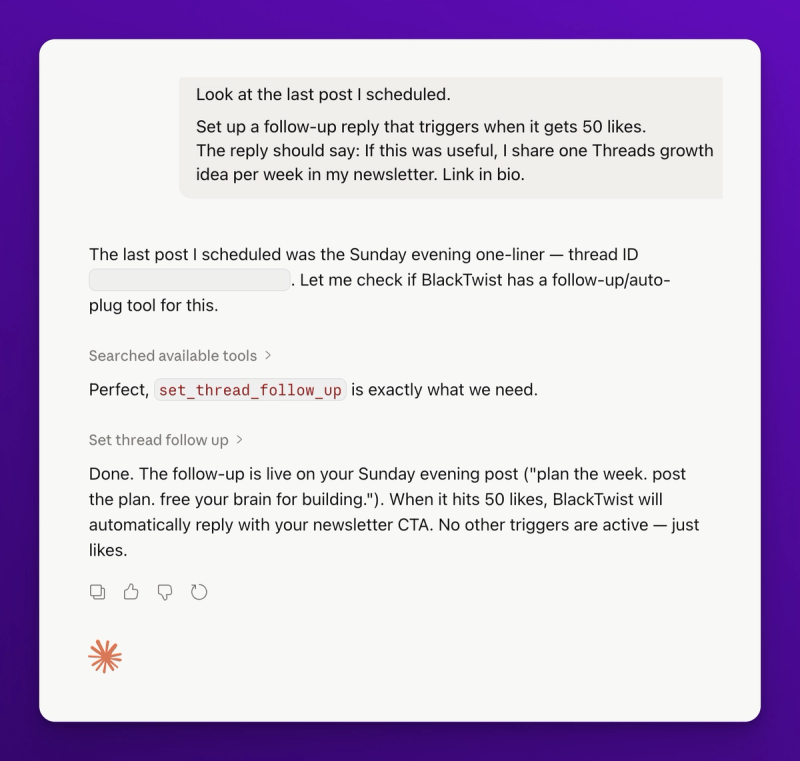
Three things to notice.
The delay trigger. The delay is how long BlackTwist waits after publishing the original post before posting the follow-up reply. Set it to 30 minutes and the reply drops exactly 30 minutes after your post goes live. This gives the algorithm time to push the post before your follow up appears. Replies from the post author can affect how the algorithm treats the post, so waiting lets the initial push complete.
The engagement trigger. You can set triggers based on likes, replies, reposts, or quotes. Pick whichever metric matters for the type of post. A question post? Replies trigger makes sense. An opinion post? Likes or quotes.
The reply text. Keep it short. Keep it honest. The worst follow-ups are long marketing pitches. The best ones feel like a natural next thought from the author.
Workflow 2: Set Follow-Ups for an Entire Week
This is where it gets powerful. If you ran the weekly planning workflow from Post 2, you have 21 scheduled posts. Why set up follow-ups one by one? Let Claude do all 21.
For every post I have scheduled for next week, set up a follow-up reply. Use these rules:
Morning short posts = 50 likes trigger, reply promoting my newsletter.
Midday threads = 20 replies trigger, reply promoting my course.
Evening one liners = 30 quotes trigger, reply linking my newsletter.
First, list all posts scheduled for next week. Then for each one, check if it already has a follow-up. If it does, skip it. If not, create one.
Claude walks through all 21 posts. For each, it checks if a follow-up exists, skips the ones that do, and creates the new ones.
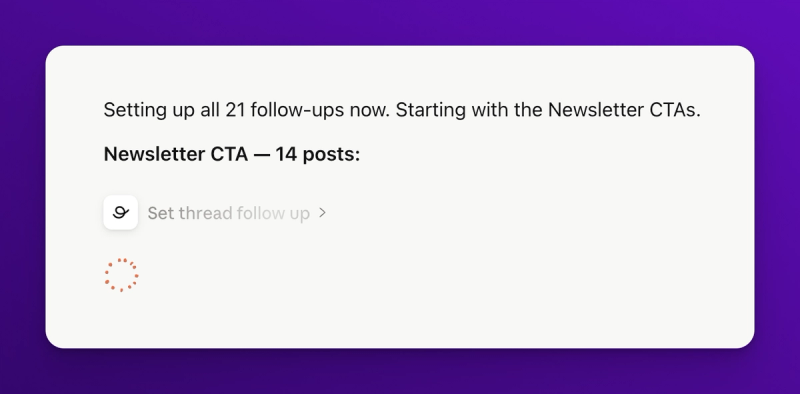
This is a 5-minute workflow that would take an hour in the dashboard. And it's the kind of task you'd put off forever because it's tedious, which means your posts go out without follow-ups, which means you leave growth on the table.
Workflow 3: Smart Follow Ups Based on Post Type
You can get more clever. Ask Claude to pick the right follow-up based on the post's content.
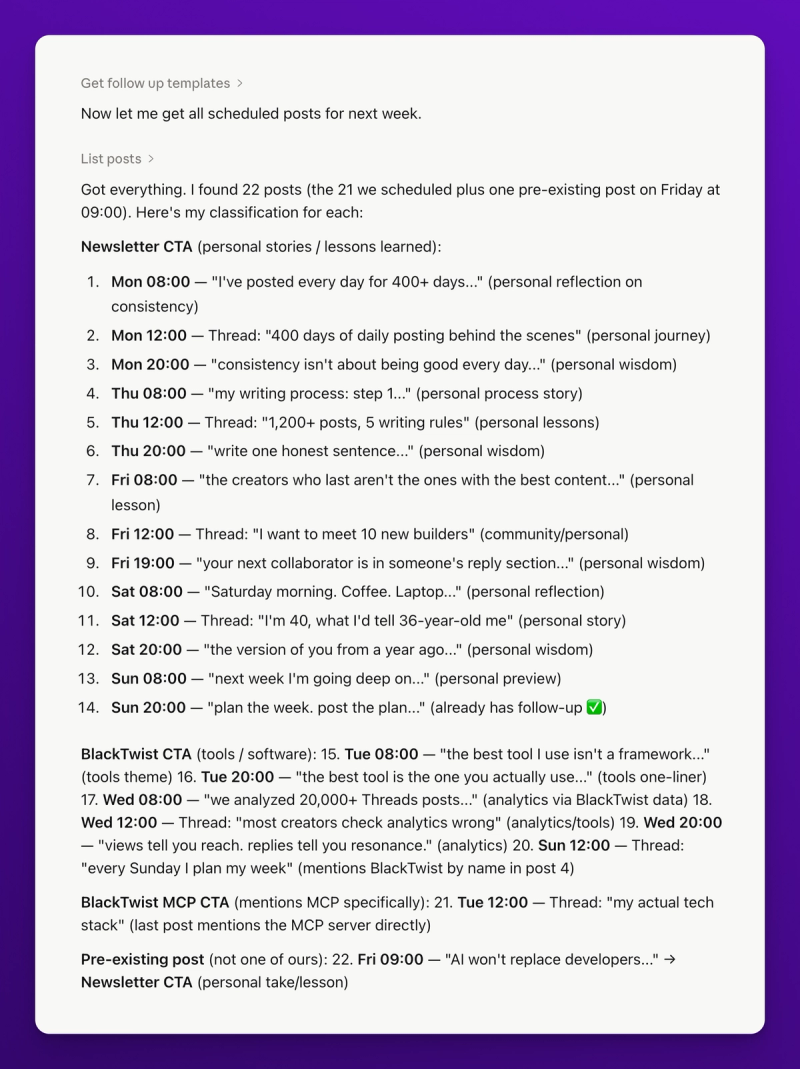
For every post I have scheduled for next week, read the post text and decide what kind of follow-up makes sense.
If the post is about tools or software, use the "BlackTwist CTA" follow-up.
If the post is about personal stories or lessons learned, use the "Newsletter CTA" follow-up.
If the post is about the BlackTwist MCP, use the "BlackTwist MCP CTA" follow-up.
Use 50 likes as the default trigger. Tell me which posts you matched to which follow-up before creating anything.
Claude reads each post, classifies it, and creates a match map. You review the map, approve it, and Claude sets up all the follow ups in one pass.
Workflow 4: Review and Adjust Existing Follow-Ups
Follow-ups aren't fire and forget. You should review them weekly to see what's working. Claude can help with this too.
Show me all my posts from the last 30 days that had follow-ups. For each, tell me: did the follow up trigger? How much engagement did the follow-up itself get? And which follow-up text converted best?
This is where BlackTwist's analytics come in. Claude combines get_thread_follow_up with get_post_analytics to pull both the follow up configuration and the post performance. You get a single report showing which follow-ups fired, which didn't, and which ones got replies.
From there you can tell Claude to update the underperformers.
The follow-up on the Tuesday post never triggered because it only got 40 likes. Lower the trigger to 25 likes for all future Tuesday posts.
Claude applies the new trigger to upcoming posts.
What Makes a Good Follow-Up
A few things I've learned from running hundreds of follow-ups.
Short is better than long. Two sentences max. The follow-up is a bridge, not a destination. Get people curious enough to click.
Specific links beat generic ones. "Link in bio" converts worse than a direct URL. If your platform allows it (like Threads and Bluesky), use the direct link. Threads does allow links in replies (though it's not suggested in the main post), so take advantage.
Credit the post. Something like "the idea in this post is from my newsletter, I write about this weekly" feels natural. Readers like knowing there's more where this came from.
Don't shill. "BUY MY COURSE NOW FOR 50% OFF" doesn't work. "I wrote a longer piece about this in my course if you want the full framework" does.
Match energy. If the post is personal and vulnerable, the follow-up should be warm. If the post is punchy and contrarian, the follow up can be direct. Don't break the tone.
Common Questions
Does BlackTwist check the post every second? BlackTwist checks on a regular interval. If your post hits the trigger between checks, the follow-up fires on the next check.
Can I cancel a follow-up after I set it? Yes. Ask Claude. "Cancel the follow up on my Tuesday morning post." Claude will call set_thread_follow_up with a delete flag.
What if my post doesn't hit the trigger? Nothing happens. The follow-up just doesn't fire. You can manually post a comment later if you want to.
Can I have multiple follow-ups on the same post? Not currently. BlackTwist supports one follow-up per post. If you want multi step follow-ups, schedule the second one manually once the first fires.
Does this work for Bluesky? Yes. Same tools. The concept and the tools are identical.
Is follow-up automation on the free plan? Yes. Follow-up are a feature available to everyone.
What's Next
You now have a system for creating, scheduling, and maintaining follow-ups across your whole content calendar. That's the growth engine running. But growth without measurement is just vibes. You need to know what's working so you can do more of it.
In Post 4 (the final post in this series), I'll show you how to run a full weekly analytics review from Claude. Pull the numbers, build a custom dashboard as an HTML artifact, and let Claude propose content pillars for the week ahead based on what actually performed. The last step closes the loop: good data in, good content out, better growth.
If you haven't connected the BlackTwist MCP Server yet, go to blacktwist.app/mcp/docs. You know the drill.