
I used to start every Claude conversation the same way. "Write me a Threads post about consistency." Claude would write something generic. I'd rewrite half of it. Then I'd ask for another draft. Rewrite that too. Three rounds later I'd have a post that sounded like me, but only because I rewrote most of it myself.
The problem wasn't Claude. The problem was that Claude didn't know my voice, my audience, or my content strategy. Every conversation started from zero.
Social media skills fix this. They're open-source instruction sets that teach Claude how to write for you specifically. Your voice. Your platforms. Your content pillars. Install them once, and every post Claude writes sounds like you from the first draft.
This guide walks you through installing the skills, setting up your profile, and using them to write posts, threads, and carousels. If you already use the BlackTwist MCP Server (covered in our four part series), the skills plug right in. Claude writes the content AND schedules it in one conversation.
Try BlackTwist for free
4,000+ creators and small companies use BlackTwist to grow their audiences every month- What Are Social Media Skills
- Install the Skills
- Step 1: Set Up Your Context
- Step 2: Write Your First Post
- Step 3: Write a Thread
- Step 4: Plan a Content Calendar
- Step 5: Repurpose What Already Works
- Step 6: Analyze What's Working
- How Skills and the BlackTwist MCP Server Work Together
- Common Questions
- Get Started
What Are Social Media Skills
Skills are markdown files that live in your project. Each skill gives Claude a specific capability: writing posts, planning content calendars, analyzing performance, writing hooks. Think of them as specialized assistants that Claude activates when the task matches.
The social media skills collection has 13 skills organized into four groups.
Foundation. One skill that captures your voice, audience, and content pillars into a context file. Every other skill reads this file before doing anything.
Strategy. Three skills for content strategy, content calendars, and platform specific tactics.
Creation. Five skills for writing posts, threads, carousels, hooks, and repurposing content across platforms.
Analysis. Four skills for tracking performance, analyzing patterns, monitoring follower growth, and getting optimization recommendations.
You don't need all 13. Most people start with the foundation skill and one or two creation skills. Add more as your workflow grows.
Install the Skills
Go to the releases page at github.com/blacktwist/social-media-skills/releases and download the latest release zip file (social-media-skills-vx.x.x.zip) and unzip it.
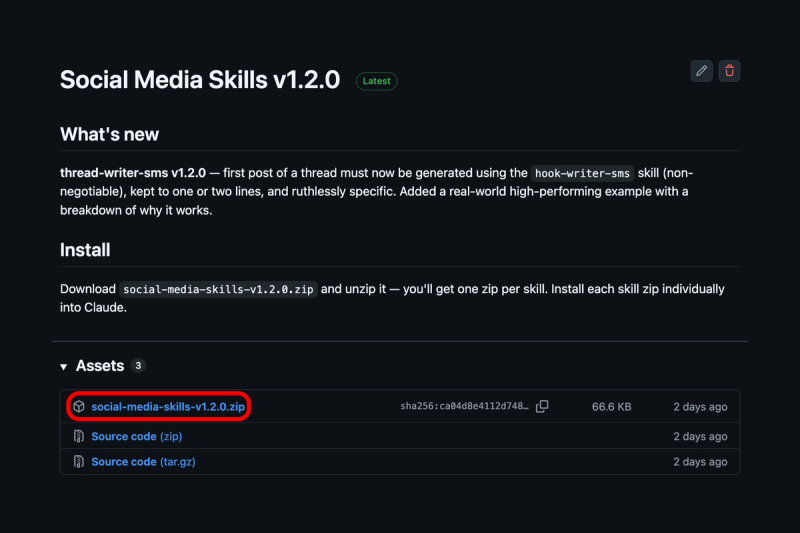
GitHub Social Media Skills Releases page
Each skill is a separate zip file. You don't need all 13 right away. Start with these three.
social-media-context-sms.zip(the foundation skill)post-writer-sms.zip(write single posts)thread-writer-sms.zip(write multi post threads)
Now open Claude and add them one by one. Click "Customize", "Skills", the plus button, "Create skill", "Upload a skill"
Claude will import the skill and show it in your tools list. Repeat for each skill you want to install.
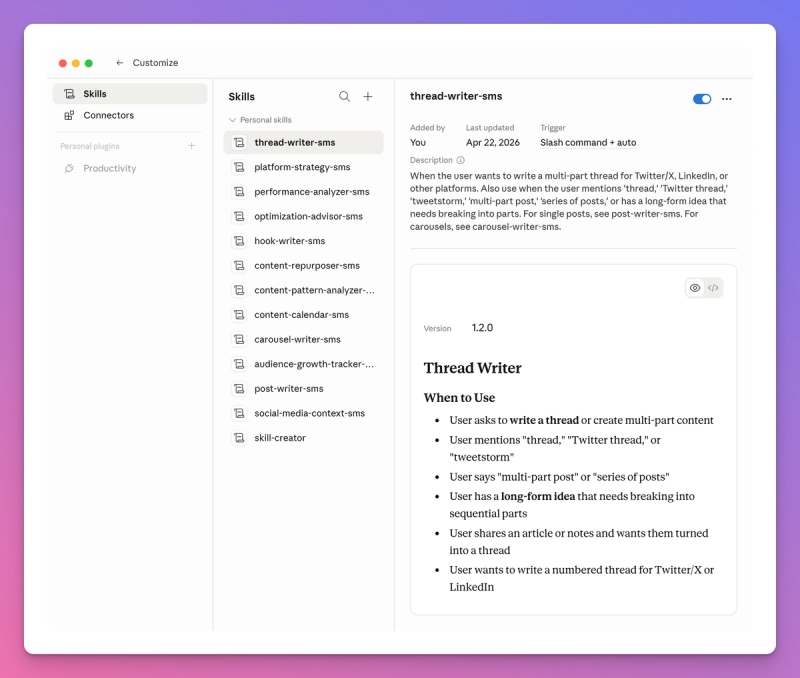
That's it.
Once installed, Claude activates the right skill based on what you ask. Say "write a Threads post" and Claude loads the post writer. Say "plan my content calendar" and Claude loads the calendar skill. You don't need to reference skills by name.
You can always come back to the releases page later and add more skills as your workflow grows. The analysis skills are worth adding once you have a few weeks of content published and want to see what's working.
Step 1: Set Up Your Context
Before writing anything, run the foundation skill. This creates a context file that every other skill reads.
Start a conversation with Claude and say:
Set up my social media context.
Claude will ask you about your identity, target audience, voice, content pillars, and platform preferences. You can dump everything at once or walk through it section by section.
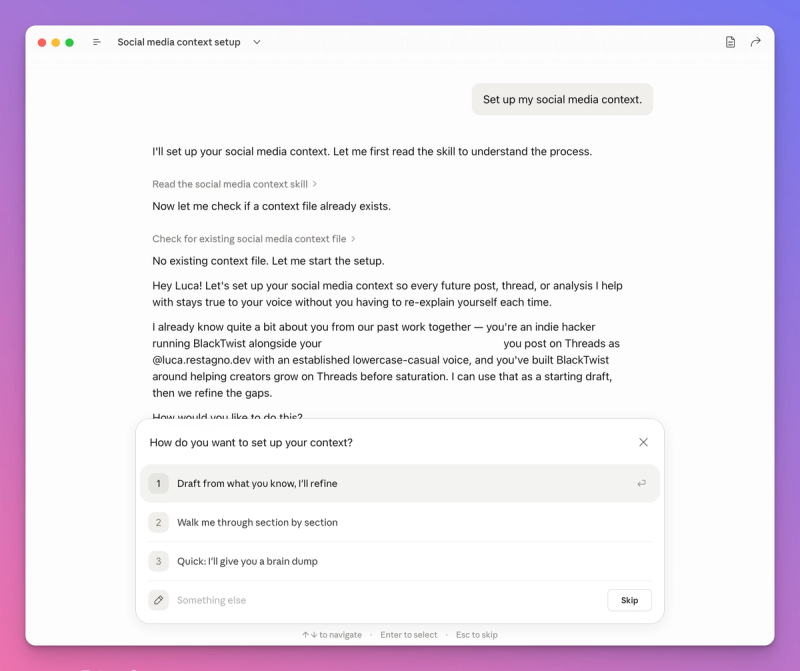
The quick path works if you already know your positioning. Paste your bio, a few example posts you're proud of, and a sentence about who you write for. Claude will draft the full context file from that.
The conversational path is better if you haven't nailed down your strategy yet. Claude asks targeted questions. Who is your audience. What do you sound like. What topics do you cover. What do you never want to say.
Either way, Claude creates .agents/social-media-context-sms.md in your project. Here's what the output looks like.
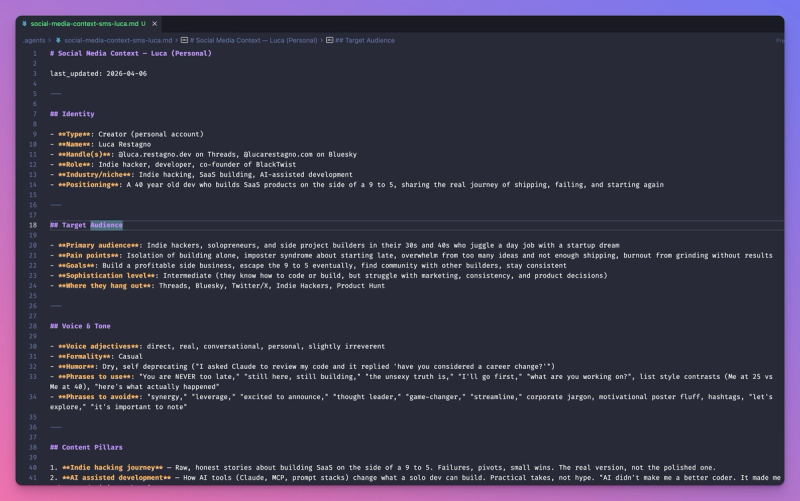
This file is your single source of truth. Every skill reads it before writing. Update it anytime your voice or strategy changes by saying "update my social media context."
Step 2: Write Your First Post
With your context set up, writing a post is one sentence.
Write a Threads post about why most people quit building too early.
Claude loads the post writer skill, reads your context file, and writes a post in your voice. Not a generic motivational quote. A post that sounds like something you'd actually publish.
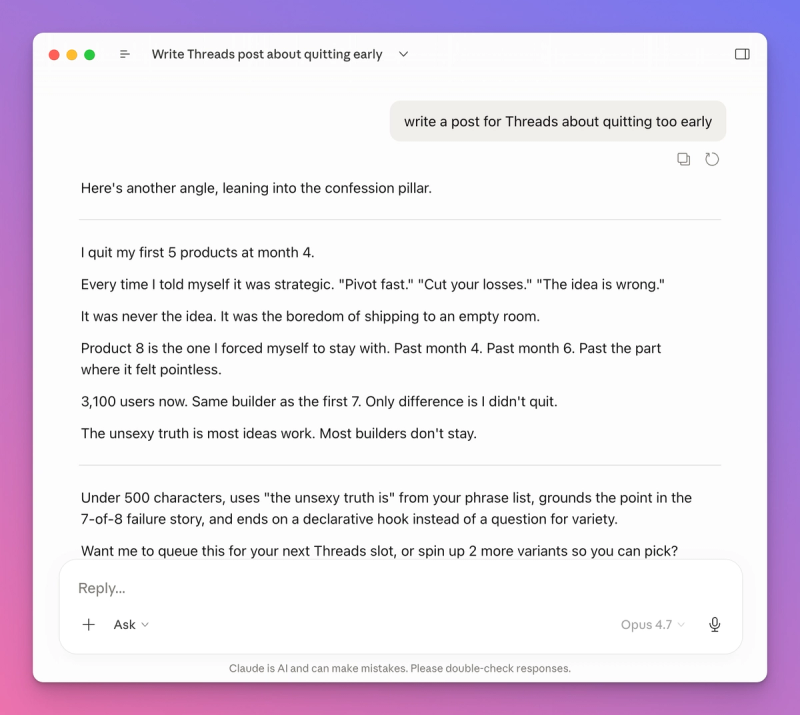
The post writer knows the rules for each platform. Character limits. Line break patterns. Where to put hashtags (or not). How hooks work differently on LinkedIn versus Threads. You don't need to specify any of this. Claude handles it based on the platform you chose.
If you want to iterate, just say what to change.
Shorter. Start with a question instead. Drop the last line.
Claude rewrites without losing your voice. The context file keeps every draft grounded in how you actually sound.
Write for Multiple Platforms at Once
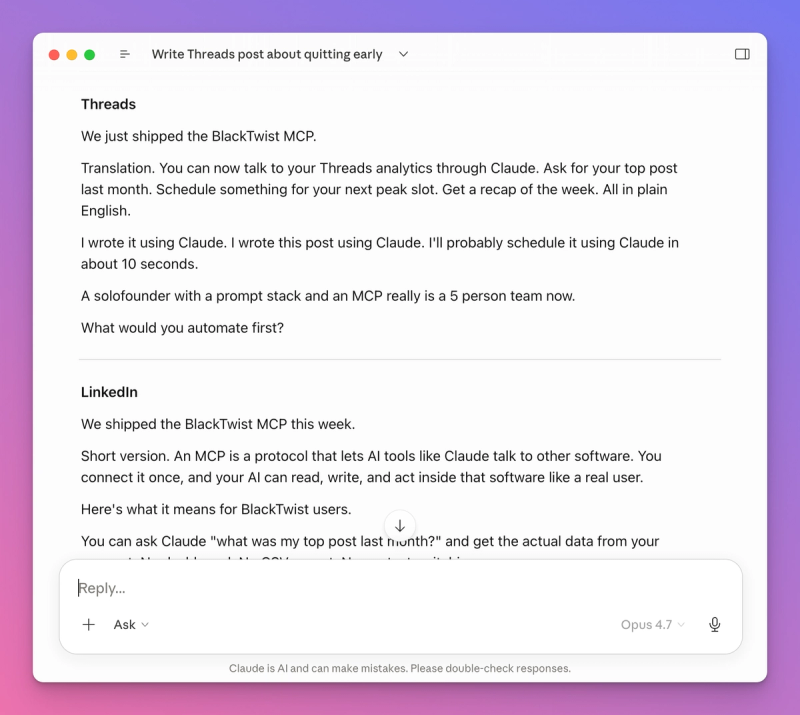
Write a post about this week's product update. Give me a version for Threads and one for LinkedIn.
Claude writes both versions. Same core idea, different structure. The Threads version is punchy and conversational. The LinkedIn version has more white space, a clear hook for the "see more" click, and a CTA at the end.
Step 3: Write a Thread
Threads and Twitter/X reward multi post threads because they keep people reading longer. The thread writer skill handles the structure so you can focus on the idea.
Write a thread about the 5 tools I use to build SaaS on the side of my day job.
Claude picks a thread format (listicle, story arc, framework, breakdown, or contrarian), writes the hook, builds out each post, and closes with a call to action. Each post in the thread stands on its own but connects to the next.
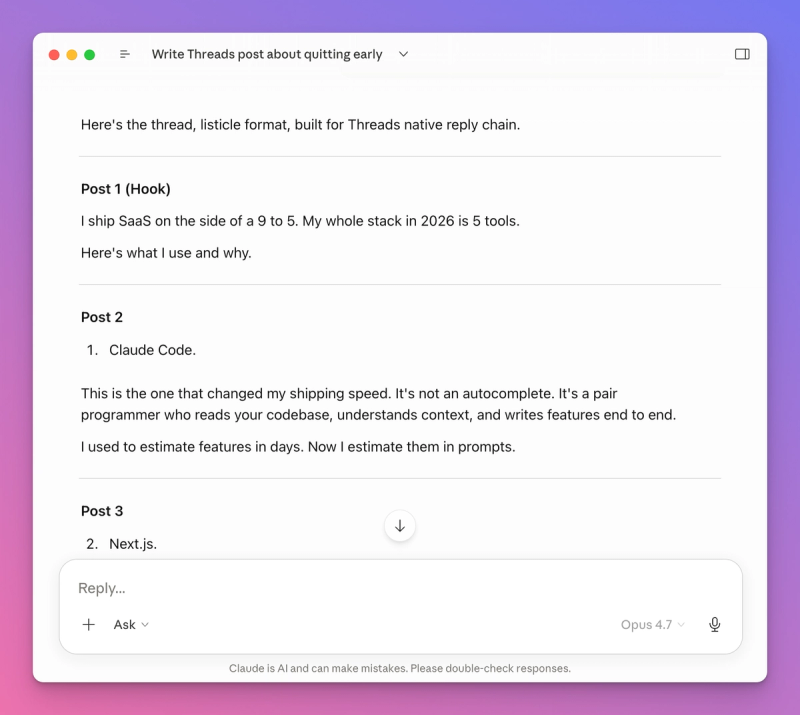
The hook is where most threads fail. The thread writer skill has nine hook patterns built in: contrarian, question, story opener, statistic, list preview, bold claim, empathy, before/after, and confession. Claude picks the one that fits your topic and voice.
If you want to see alternatives:
Give me 3 different hooks for this thread.
Claude writes three options. You pick the one that hits hardest.
Step 4: Plan a Content Calendar
Once you can write individual posts and threads, the next step is planning a full week or month.
Plan my content calendar for next week. I post twice a day on Threads. Morning and evening.
Claude loads the calendar skill, reads your content pillars from the context file, and builds a balanced week. Each day gets a topic, a format (post, thread, or carousel), and a one line brief describing the angle.
The calendar skill makes sure your pillars are evenly distributed across the week. If you have four content pillars, you won't get all four crammed into Monday. Claude spreads them out so your audience sees variety.
After you approve the calendar, you can tell Claude to write every post.
Write all 14 posts from this calendar.
Claude works through the list and drafts each one. You review, iterate, and if you have the BlackTwist MCP Server connected, schedule everything without leaving the conversation.
Step 5: Repurpose What Already Works
The content repurposer skill takes one piece of content and turns it into multiple formats.
Take this blog post and turn it into a Threads post, a LinkedIn post, and a Twitter thread.
Paste the blog post or give Claude a URL. Claude extracts the core ideas and rewrites them for each platform. The Threads version gets the punchiest angle. LinkedIn gets the professional framing. The Twitter thread gets a hook and a numbered breakdown.
This is where the time savings compound. One piece of thinking becomes three or four pieces of content across platforms. The repurposer skill knows which parts of your original content will resonate on each platform, so you're not just copy pasting with minor edits.
Step 6: Analyze What's Working
If you have the BlackTwist MCP Server connected, the analysis skills pull your real data and tell you what to do with it.
Analyze my content performance from the last 30 days. What patterns do you see?
Claude loads the content pattern analyzer, pulls your post data through the BlackTwist MCP Server, and looks at performance across seven dimensions: topic, format, posting time, length, hook type, tone, and platform.
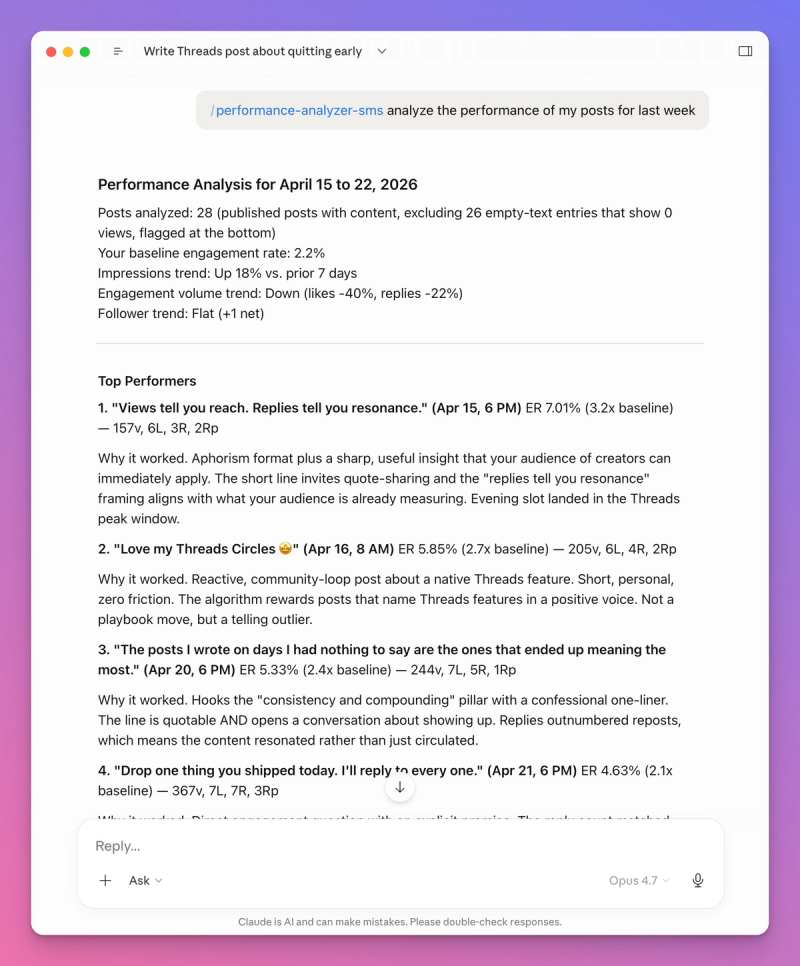
The output isn't just numbers. Claude tells you what to do more of and what to do less of. Specific, actionable, based on your data.
The optimization advisor skill goes one step further. It takes findings from all the analysis skills and organizes them into tiers: quick wins you can implement today, strategic shifts for the next month, experiments to try, and things to stop doing.
How Skills and the BlackTwist MCP Server Work Together
The skills write the content. The MCP Server publishes it. Together they create a complete workflow where you never leave Claude.
Here's what a typical session looks like.
- Claude reads your context file (skills)
- You ask for a content calendar (calendar skill)
- Claude drafts every post (post writer and thread writer skills)
- You review and iterate
- Claude schedules everything to BlackTwist (MCP Server)
- Next week, Claude pulls your analytics (MCP Server)
- Claude analyzes patterns and proposes pillars (analysis skills)
- Back to step 2
The loop runs itself. Each week builds on the last because Claude has your voice dialed in AND your performance data loaded.
If you don't have the BlackTwist MCP Server connected (which is free and available on all plans), the skills still work. Claude writes the content and tells you to post it manually. You lose the scheduling and analytics automation, but the writing quality stays the same.
Common Questions
Do I need to install all 13 skills? No. Start with social media context (foundation) and post writer (creation). Add more when you need them. The thread writer and content calendar are usually the next two people add.
Do skills work on Claude Mobile? Skills work on any Claude interface that supports them. Claude Code has native skill support. Claude on the web and Claude Desktop support skills through file uploads. Check the GitHub repo for platform specific setup instructions.
Can I customize a skill? Yes. Skills are markdown files in your project. Open the SKILL.md file, edit the instructions, and Claude follows your version. Fork the repo if you want to track your customizations separately.
Do skills work with other social media tools? The skills are designed to work with BlackTwist MCP Server for scheduling and analytics. Without it, Claude generates the content and gives you manual posting instructions. The writing quality doesn't depend on BlackTwist.
How do I update my context file? Say "update my social media context" in any conversation. Claude will read your existing file and ask what you want to change. You can update a single section without regenerating the whole file.
Are the skills free? Yes. The skills are open source under the MIT license. Install them, customize them, share them. The BlackTwist MCP Server is also free on all plans for post scheduling and basic analytics.
Get Started
Install the skills in 30 seconds in the Terminal (or download the skills files).
npx skills add blacktwist/social-media-skills
Set up your context. Write your first post. See the difference when Claude actually knows your voice.
If you want the full workflow with scheduling and analytics, connect the BlackTwist MCP Server too. Post 1 of our BlackTwist MCP series walks you through the setup in 30 seconds.
The skills repo is at github.com/blacktwist/social-media-skills. Star it, fork it, or just install it and start writing.