Crossposting to Threads and Bluesky
Scheduling
Crossposting lets you write a post once and publish it to your Threads and Bluesky accounts together. You put the accounts in a social set, and every post you write as one of them goes to all of them.
Crossposting is available on every plan.
What is a social set?
A social set is a named group of your connected accounts. A common one holds your personal Threads account and your personal Bluesky account.
The account you write as decides where a post goes. The post goes to every account in the same set. An account that belongs to no set posts alone, exactly like before.
A set holds one account per platform, and each account belongs to one set at a time.
Creating a social set
Open Settings and choose Social sets.
Click New set and give it a name.
Click Add account and pick the accounts you want in the set.
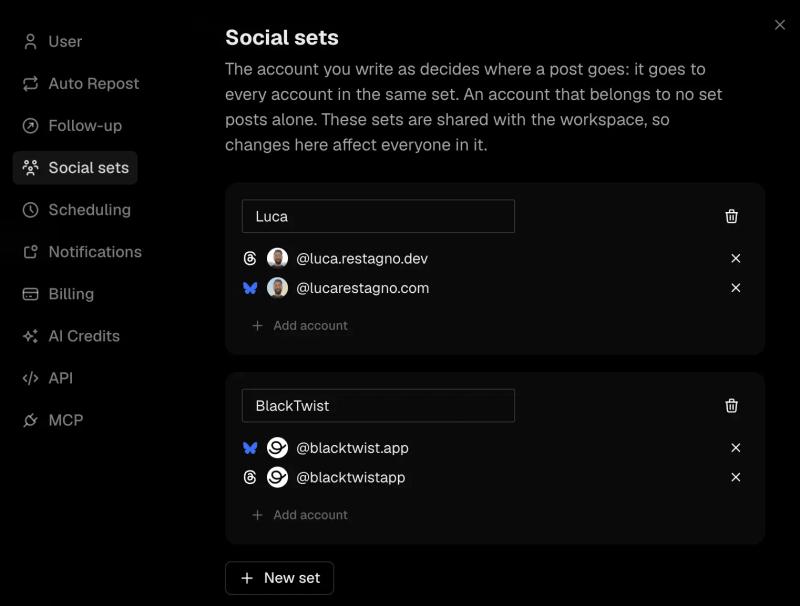
Social sets in Settings
You can create as many sets as you need. For example, keep one set for your personal accounts and another for your brand. Each set needs its own name.
To take an account out of a set, click the X next to it. If you delete a set, your accounts stay connected and go back to posting alone.
If you work in a team workspace, the workspace shares its sets with every member, so a change you make affects everyone in it. Only members with edit access can change the sets. Everyone else can see how
they are arranged.
Writing a crossposted post
Start a new post as any account in a set. BlackTwist adds the rest of the set for you. You see one square for each account at the top of the editor.
You can change where this one post goes without touching your set.
- Click the plus button next to the squares to open Post to, then tick or untick accounts. The account you write as is always on.
- Click an account's square and choose Don't post here to leave that account out.
- Click Manage social sets at the bottom of Post to to jump to your sets.
When you schedule or publish, BlackTwist creates a post for each account. If it can't schedule one of them, the others still go through and a message tells you which account failed.
Crossposted posts in the calendar
The calendar shows a crossposted post as one entry, with an icon for each platform it goes to.
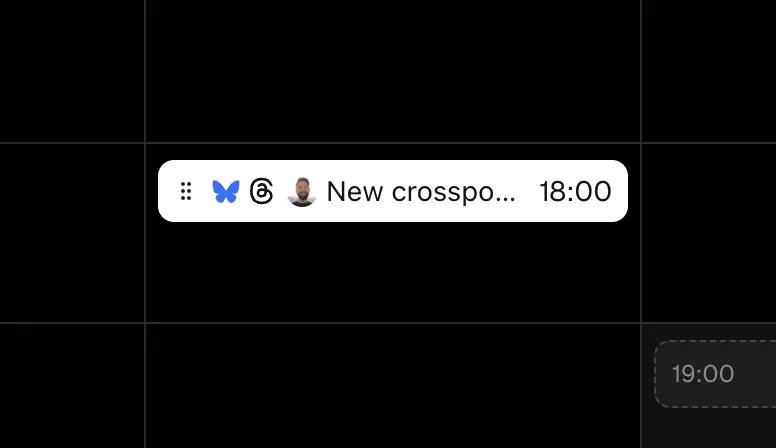
Crosspost in the Calendar
Drag the entry to a new time and every account's version moves with it. Delete it and every version goes with it. Versions that already published stay as they are.
Customizing a post for one platform
Sometimes a post needs to read differently on one platform. Bluesky allows 300 characters per post and Threads allows 500, so a post that fits on Threads can be too long for Bluesky.
BlackTwist tells you when that happens. You see a red warning at the top of the editor, a red dot on the account's square, and a small platform icon with the characters over next to the post's counter. Click that icon to customize the post for that account.
The warning doesn't stop you from scheduling. A Bluesky post over 300 characters still fails when it publishes, so customize it before you schedule.
You can also customize at any time.
Click the account's square at the top of the editor.
Choose Customize for this account.
BlackTwist copies the main post into a separate version for that account and labels it Detached. The account's square gets a small pencil icon. Click the square to switch between the main post and that account's version.
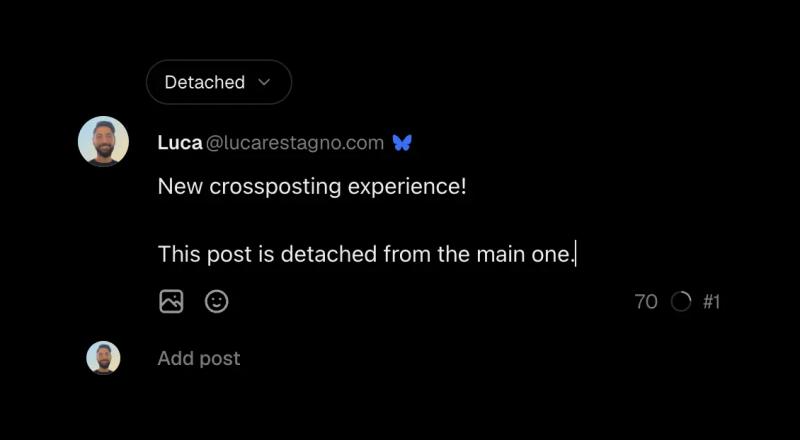
Detached post for Bluesky
A detached version covers that account's whole thread. Edits you make to the main post no longer reach it, and edits you make to it stay on that account. Your other accounts keep following the main post.
Click Detached to see two options.
- Attach puts the version back in sync with the main post. BlackTwist replaces the version with the main post, so your custom edits go away.
- Delete removes that platform from this post.
What each platform gets
Every account's version gets the main post's text, images, topic and spoilers. Two platform rules apply to Bluesky.
- Bluesky takes up to 4 images per post. If a post has more, the Bluesky version gets the first 4.
- Bluesky doesn't show GIFs, so the Bluesky version leaves them out.
BlackTwist counts Bluesky characters the way Bluesky does, so an emoji counts as one character.
FAQ
Can an account be in two sets? No. An account belongs to one set at a time. In a team workspace, if a teammate put the account in another set, ask them to take it out first.
Can a set hold two Threads accounts? No. A set holds one account per platform.
What happens to accounts that aren't in a set? They post alone, the same way they always have.
Does deleting a set disconnect my accounts? No. The accounts stay connected and post alone.
What happens if my Bluesky version is too long? It fails when it publishes. Customize the Bluesky version to fit 300 characters before you schedule.
Can I crosspost from the calendar? Yes. When you create or edit a post from the calendar, you get the same account squares, and you can customize, attach and delete versions there too.
Why can't I add one of my accounts? If your plan doesn't cover that account, BlackTwist leaves it out of your sets and you can't tick it in Post to. Upgrade your plan to use it.
Your Threads growth starts here.
Schedule smarter. Grow faster. Start free.BlackTwist
Give your social a twist.
Links
PricingThreads SchedulerEngagerAnalyticsAI StudioCompareThreads vs. BlueskyHelp centerChangelogGlossaryBlog✨ Affiliate — Earn 30%
© Copyright 2026 BlackTwist. All rights reserved.